Exam FM calculator guide

A reproducible BA II Plus workflow for Exam FM

Declare the timeline, rate period, calculator state, and cash-flow viewpoint before entering a value. After computing, reproduce the result with an equation, recursion, or direct cash-flow sum that does not share the same hidden setup.

State-to-check protocol

The seven-step workflow

Worksheet values persist. Treat the displayed answer as one stage of a reproducible calculation rather than the end of the model.

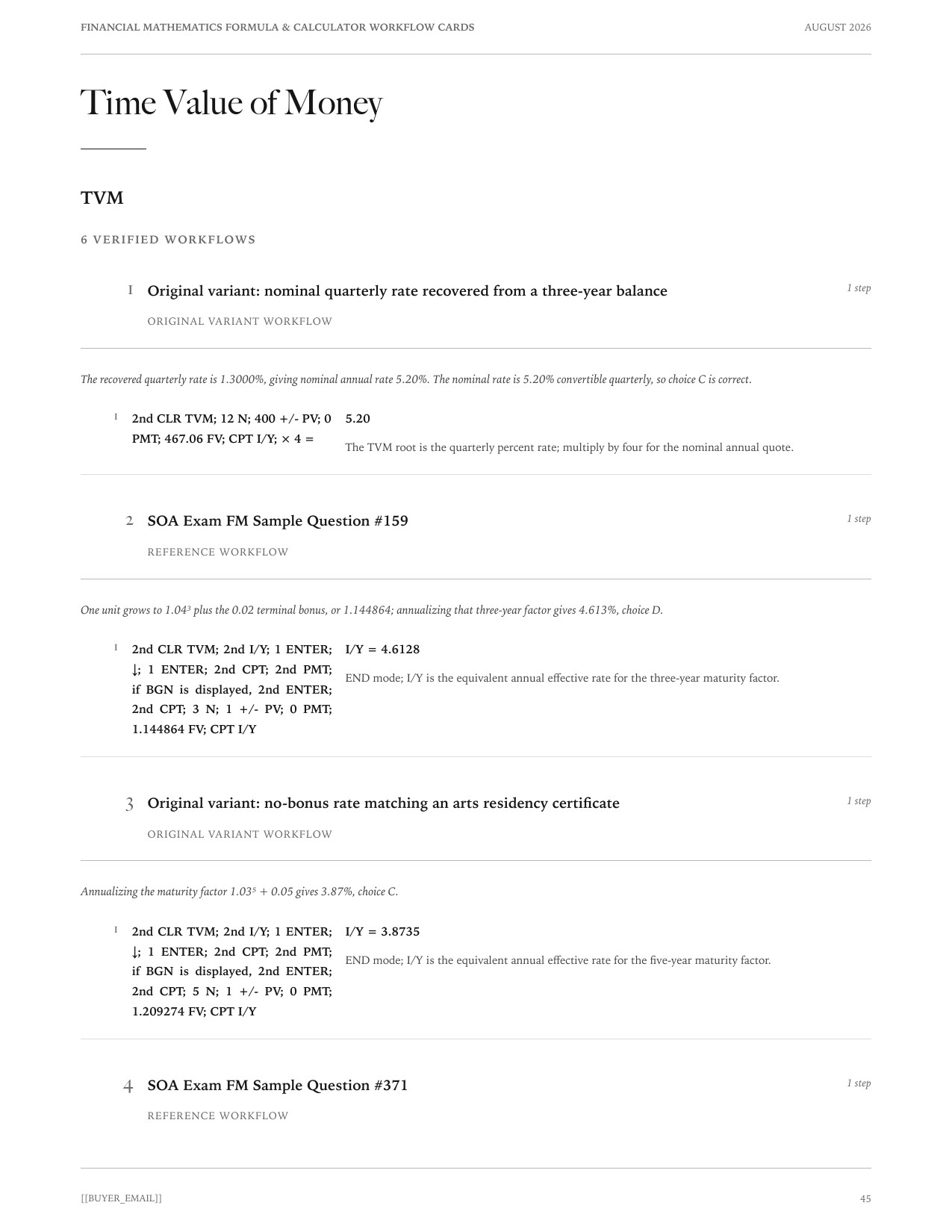
Actual BA II Plus workflow page from the Financial Mathematics Formula and Calculator Workflow Cards
Actual independently produced PDF workflow page from version 1.0.1, updated 2026-08-04. It shows a problem-specific keystroke record. Texas Instruments remains the authority for device operation; the seven-step protocol is an ActuaryProof editorial workflow.
  1. Draw the timeline and choose a focal date

    Put every dated cash flow on paper. Mark whether the requested value is before or after a payment before choosing TVM, CF, bond, or amortization functions.

  2. Convert the rate to the timeline period

    Decide whether one step is a month, coupon period, quarter, or year. Convert once and write the resulting effective rate next to that step.

  3. Record END or BGN and P/Y/C/Y

    Do not rely on inherited settings. For the transparent direct-period convention used below, P/Y = C/Y = 1 and I/Y is the effective percentage for one N period.

  4. Clear the worksheet you will use

    Use 2nd CLR TVM before a TVM calculation. In the cash flow worksheet, use CF followed by2nd CLR WORK. Clearing TVM does not clear old cash flows, and clearing cash flows does not correct END/BGN or frequency settings.

  5. Choose one sign viewpoint

    Cash paid and cash received need opposite signs. State whether you are the borrower, lender, buyer, or investor before using the sign-change key.

  6. Enter values and retain stored precision

    Show at least four decimals for diagnosis, but do not re-enter a rounded intermediate value. Copy the requested result with its unit and round once at the end.

  7. Reproduce the value independently

    Use an equation of value, a balance recursion, an NPV substitution, or a direct cash-flow sum. A second run through identical keys is not an independent check.

Cash-flow viewpoint

The sign convention that prevents Error 5

Choose one viewpoint and keep it. From a borrower's viewpoint, loan proceeds are positive and repayments are negative. From an investor's viewpoint, the purchase price is negative and coupons, redemption, or sale proceeds are positive. TVM and IRR need at least one value with the opposite sign because the unknown rate or payment balances cash entering and leaving the chosen viewpoint.

Fast diagnosis

If PV, PMT, and FV all have the same sign, stop before pressing CPT. The setup does not yet describe an exchange of value. Use+/- after typing a magnitude; do not use the subtraction key as a substitute for the sign-change key.

Level cash flows

TVM worksheet: N, I/Y, PV, PMT, and FV

Use the TVM worksheet when payments are level and equally spaced. Put every quantity on one time scale before keying it in: monthly N requires a monthly effective I/Y, half-year coupon periods require a half-year yield, and annual periods require an annual rate.

PV+PMT aN‾∣i+FV(1+i)−N=0PV+PMT\,a_{\overline{N}|i}+FV(1+i)^{-N}=0
RegisterEnter
NTotal number of equal periods
I/YInterest percentage per N period
PVValue at time 0
PMTLevel payment each period
FVValue at time N after the last payment

Enter zero for an unused register, enter the four known values, and press CPT followed by the unknown register. For a 20,000 loan repaid by 60 month-end payments at 0.5% per month, the direct-period sequence is60 N; 0.5 I/Y; 20000 PV; 0 FV; CPT PMT, producing approximately −386.66 from the borrower's viewpoint.
Frequency

P/Y and C/Y without hidden rate conversion

P/Y is the number of payments per year and C/Y is the number of compounding periods per year when the calculator is asked to convert an annual nominal rate internally. That convention is valid, but it is easy to mix with a rate already converted on paper. The safer Exam FM workflow is usually to convert the stated rate to the effective rate for one cash-flow period, set P/Y = C/Y = 1, and enter that rate directly in I/Y.

I/Y is entered as a percentage: 0.5 I/Y means 0.5% per period. If you deliberately retain P/Y and C/Y other than 1, record those values next to the timeline and do not also divide or take a root outside the calculator. One conversion path is enough.

Payment timing

END versus BGN

a¨n‾∣i=(1+i)an‾∣i\ddot{a}_{\overline{n}|i}=(1+i)a_{\overline{n}|i}

END places the first PMT one period after PV; BGN places the first PMT at the same focal date as PV. The BGN indicator remains visible when beginning mode is active. After an annuity-due calculation, switch back to END before starting an ordinary loan or bond calculation. END/BGN affects TVM payments, but it does not shift entries in the Cash Flow worksheet: there, CF0, C01, C02, and their positions define the timing explicitly.

Unequal cash flows

CF worksheet and NPV

Use CF when amounts vary by period. Each worksheet step represents one equal-length period, including zero-cash-flow periods.

  1. Enter the timeline

    Press CF; 2nd CLR WORK. Enter the time-0 amount as CF0, then C01, C02, and so on. Use F01, F02, … only for consecutive repetitions of the same amount; a frequency does not create a gap in the timeline.

  2. Compute NPV

    Press NPV, enter the effective percentage per worksheet period as I, move down to NPV, and pressCPT. This evaluates the following equation.

    NPV=∑t=0nCFt(1+i)tNPV=\sum_{t=0}^{n}\frac{CF_t}{(1+i)^t}
  3. Audit the sequence

    Scroll through every C and F entry before computing. Old worksheet entries after the intended final cash flow, a skipped zero period, or a frequency attached to the wrong C value can produce a plausible but incorrect NPV.

Yield solving

IRR and the root you still need to interpret

After entering the cash-flow timeline, pressIRR; CPT. The result is the percentage per worksheet period that solves the equation below. Annualize it only after identifying the period represented by one step of the worksheet.

0=∑t=0nCFt(1+r)t0=\sum_{t=0}^{n}\frac{CF_t}{(1+r)^t}

A cash-flow sequence with no sign change has no IRR. A sequence with more than one sign change can have multiple real roots, while the calculator reports only one numerical result. In that case, check the NPV profile or solve independently and reject roots that do not match the financial domain. For any IRR, substitute the displayed rate back into NPV and confirm that the result is near zero before using it.

Loan schedules

AMORT after a valid TVM setup

First solve or enter N, I/Y, PV, PMT, and FV in END or BGN mode. Then press 2nd AMORT, enter the first payment number in P1 and the last in P2, and move down through BAL, PRN, and INT. P1 = P2 isolates one payment; P1 = 1 and P2 = k summarizes the first k payments. Interpret the displayed signs from the same cash-flow viewpoint used in TVM.

Troubleshooting

Common BA II Plus failures on Exam FM

A result that is numerically tidy can still come from the wrong timeline. Diagnose the setup before repeating the same keystrokes.

  • Every cash flow has the same sign

    TVM cannot balance a transaction and IRR has no sign change. Reverse receipts or payments according to one consistent viewpoint; do not reverse both.

  • The answer is off by a factor of 12 or 2

    N and I/Y are on different periods, or a periodic yield has been annualized twice. Match the timeline first, then distinguish effective annual yield from a nominal rate convertible m-thly.

  • BGN appears after an annuity-due problem

    The mode persists. Return to END before pricing an ordinary annuity, loan, or coupon bond unless its first payment truly occurs at the valuation date.

  • NPV or IRR changes after re-entry

    Clear the CF worksheet and inspect every C/F pair. A leftover cash flow, a missing zero period, or an accidental frequency is more likely than a change in the underlying mathematics.

  • A neighboring answer choice differs only slightly

    Retain the calculator's stored precision for rates, balances, and intermediate payments. Increase displayed decimals for the audit and round once, using the unit requested by the problem.

  • IRR returns an error or an implausible root

    Check for a sign change and for multiple sign reversals. IRR is an iterative root calculation, not a guarantee that the displayed root is unique or economically meaningful.

Verified library examples

Calculator workflows in representative Exam FM solutions

These are independently written calculation records. Read each official question through its source link on the solution page; official wording is not reproduced here.

FM 35

SOA Exam FM Sample Question #35 calculator check

The factor is 957.36657, giving X = 324.72. The listed monthly deposit is 324.70. The result agrees with the published answer key, choice A.

  1. 2nd CLR TVM; 300 N; 0.6666667 I/Y; 0 PV; 310880.83 FV; 2nd PMT; 2nd SET; 2nd QUIT; CPT PMT−324.72Set BGN mode because deposits occur at the beginning of each month.

FM 29

SOA Exam FM Sample Question #29 calculator check

The root is i = 0.0890. Substitution returns the price to cents, so the annual effective yield is 8.9%. The result agrees with the published answer key, choice E.

  1. 2nd CLR TVM; 3 N; 926.03 +/- PV; 60 PMT; 1000 FV; CPT I/Y8.90END mode; the display is the annual effective yield in percent.

FM 94

SOA Exam FM Sample Question #94 calculator check

The monthly root is 0.770875%. Annualization gives 9.65%. The result agrees with the published answer key, choice B.

  1. 2nd CLR TVM; 120 N; 8000 +/- PV; 61.67 PMT; 8000 FV; CPT I/Y0.770875Monthly internal rate.
  2. 2nd ICONV; 0.770875 NOM; 12 C/Y; CPT EFF9.65Convert the monthly rate to annual effective.

FM 124

SOA Exam FM Sample Question #124 calculator check

At 10%, projects A, B, and C have NPVs 4.59, −2.36, and −9.54; only A adds value, so the optimal selection is Project A alone, choice D.

  1. CF; 2nd CLR WORK; CF0=-800; C01=500; C02=500; C03=-175; C04=100; NPV; I=10; CPTNPV = 4.59Annual cash flows use their stated signs; this is Project A.
  2. CF; 2nd CLR WORK; CF0=-800; C01=500; C02=300; C03=-175; C04=150; C05=200; NPV; I=10; CPTNPV = -2.36Annual cash flows use their stated signs; this is Project B.
  3. CF; 2nd CLR WORK; CF0=-800; C01=500; C02=250; C03=-175; C04=200; C05=200; NPV; I=10; CPTNPV = -9.54Annual cash flows use their stated signs; this is Project C.

FM 143

SOA Exam FM Sample Question #143 calculator check

The remaining fund at year four is 176.74, of which the insurer receives 44.19; solving the insurer cash flows −100, +125 at year two, and +44.19 at year four gives yield 24%, choice B.

  1. CF; 2nd CLR WORK; CF0=-100; C01=0; F01=1; C02=125; C03=0; F03=1; C04=44.19; IRR; CPTIRR = 24.00The worksheet period is one year; the initial investment is negative and receipts are positive.

FM 368

SOA Exam FM Sample Question #368 calculator check

The quarterly payment is 582.46. After payment 4, sixteen payments remain and the balance is 8230.86. Their scheduled total is 9319.32, so the future interest embedded in them is 1088.46, choice C.

  1. 20 · N; 1.5 · I/Y; 10000 · PV; 0 · FV; CPT · PMT−582.46Quarterly payment magnitude.
  2. 2nd · AMORT; P1 = 1 · ENTER; ↓; P2 = 4 · ENTER; ↓; ↓BAL = −8,230.86Outstanding balance immediately after payment 4.

FM 378

SOA Exam FM Sample Question #378 calculator check

The non-callable price implies annual coupon 168.32; because the bond is at a premium, the earliest year-18 call is adverse, and its 7% value is 2,284.85, choice C.

  1. 2nd CLR TVM; 20 N; 7 I/Y; 2300 +/- PV; 2000 FV; CPT PMTPMT = 168.32
  2. 18 N; 7 I/Y; 168.32 PMT; 2000 FV; CPT PVPV = -2284.85Use the earliest allowed call for this premium bond.

Optional offline reference

Financial Mathematics Formula & Calculator Workflow Cards

The current 127-page edition contains66 formula cards and237 checked workflows with 425 keyed rows. The free guide on this page is sufficient to practise the protocol.

Inspect the $19 PDF before checkout

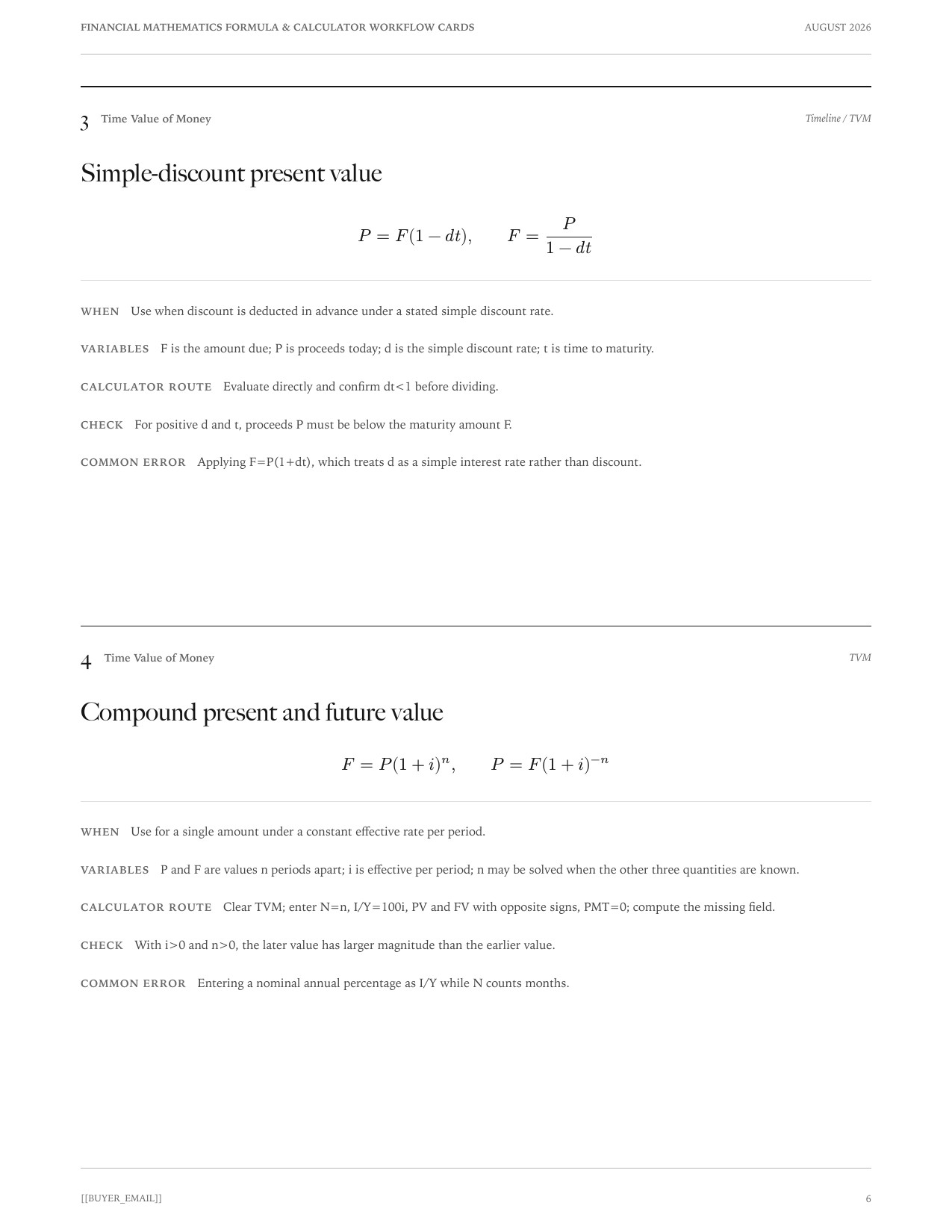
Actual financial mathematics formula card with checks and common errors
Actual independently produced formula-card page from version 1.0.1, updated 2026-08-04. It supports the delivered card format and visible error checks, not any claim about SOA approval.

Use with the mathematics

Calculator reproduction is a check, not the model

Draw the timeline, define the rate period, and write the equation of value before choosing a worksheet. Then use the calculator to reproduce the numerical result and expose entry errors. Thefree Exam FM formula sheetkeeps the corresponding annuity, loan, bond, duration, and rate conversion formulas in one reference, while theExam FM solution library connects each workflow to a complete derivation.

For calculator behavior and model-specific key labels, consult theTexas Instruments BA II Plus guidebook. This independent study guide is not affiliated with or endorsed by Texas Instruments. BA II Plus is a trademark of Texas Instruments.

Sources and accountability

Primary sources and correction path

ActuaryProof publishes the independent explanations on this page. Official exam facts on this page come from the sources above; schedules, study ledgers, and checking protocols are ActuaryProof editorial tools unless stated otherwise. Read about the publisher or report a suspected error.

Primary sources last checked: August 31, 2026.